Documentation Index
Fetch the complete documentation index at: https://slatehq.com/docs/llms.txt
Use this file to discover all available pages before exploring further.
What is Brand Kit?
Brand Kit is your central brand profile in Slate. It stores information about your brand, products, audiences, content strategy, and target markets. This data powers AI Search Analytics and can be passed into workflows as context for AI-generated content.
Brand Kit has five sections:
- Core — brand name, URL, writing style, competitors
- Products — your products or services
- Content — content types you create
- Audiences — customer segments and personas
- Geography — target regions and markets
Why It Matters
A well-configured Brand Kit makes everything in Slate more accurate and useful:
- AI Search Analytics uses your brand name, URL, and competitors to track visibility, citations, and sentiment
- Workflows use Brand Kit data as context for AI blocks — so generated content matches your tone, targets the right audience, and highlights the right product features
- Consistency — define your brand voice, personas, and positioning once, then reuse across all workflows
Setting Up Your Brand Kit
- Go to Workspace Settings in the sidebar.
- Click Brand Kit.
- Fill in the Core tab first — your brand name, URL, and at least one competitor. This is the minimum setup required for AI Search Analytics.
- Click Save to save your changes.
- Add details to the other tabs (Products, Content, Audiences, Geography) as needed.
You don’t need to fill in every tab right away. Start with Core to get AI Search Analytics running, then add products, audiences, and content types when you build workflows that need them.
Core
The Core tab contains your foundational brand information. This is the minimum setup required for AI Search Analytics.
Brand Details
- Brand Name — the name Slate monitors across AI platforms (e.g., “Acme CRM”)
- Brand URL — your primary domain (e.g.,
https://acmecrm.com)
Writing Style
- Author Persona — the voice and tone for AI-generated content
- CTA Text — your default call-to-action text
- CTA Destination — the URL your CTAs link to
Writing Sample
- Outline — a sample content outline that reflects your preferred structure
- Sample URL — a link to an existing piece of content that represents your style
Competitors
Add competitors so Slate can track their AI visibility alongside yours.
- Competitor Name — how the competitor is commonly referenced (e.g., “HubSpot”)
- Competitor URL — their primary domain (e.g.,
https://hubspot.com)
Competitors appear in Share of Voice, sentiment comparison, and citation analysis.
Core Custom Variables
Add brand-level custom fields for any additional information you want to reuse. For example:
| Variable Name | Example Value |
|---|
| Company Tagline | ”The CRM that sells for you” |
| Founded Year | ”2018” |
| Headquarters | ”San Francisco, CA” |
Products
The Products tab stores details about each product or service you offer. When you pass Brand Kit into a workflow, the AI can reference specific product details to generate accurate, product-aware content.
Fields
| Field | Description |
|---|
| Name | Product or service name |
| Description | What the product does |
| Key Features | Main features and capabilities |
| Differentiators | What makes the product unique vs. competitors |
| Ideal Customer | Who the product is built for |
| Pricing | Pricing model or details |
| Competitors | Direct competitors for this specific product |
Examples
Example 1 — SaaS product:
| Field | Value |
|---|
| Name | Acme CRM Pro |
| Description | All-in-one CRM for mid-market sales teams |
| Key Features | Pipeline management, email sequences, forecasting, custom reports |
| Differentiators | Built-in AI assistant, no per-seat pricing, 5-minute setup |
| Ideal Customer | B2B SaaS companies with 50–500 employees |
| Pricing | $99/month flat rate, 14-day free trial |
| Competitors | HubSpot Sales Hub, Salesforce Sales Cloud, Pipedrive |
| Field | Value |
|---|
| Name | SEO Audit Service |
| Description | Comprehensive technical and content SEO audit |
| Key Features | Site crawl analysis, content gap report, backlink audit, action plan |
| Differentiators | Delivered in 5 business days, includes 1-hour strategy call |
| Ideal Customer | E-commerce brands doing 1M–50M in annual revenue |
| Pricing | Starting at $2,500 per audit |
| Competitors | Moz Pro audits, Ahrefs site audit, agency competitors |
Content
The Content tab defines the types of content you create. Each content type can have its own writing style, CTA, and structure — so workflows produce output that matches the format you need.
Fields
| Field | Description |
|---|
| Name | Content type name |
| Outline | Typical structure or template for this content type |
| Samples | Example content or reference links |
| CTA Text | Call-to-action text used in this content type |
| CTA Destination | Where the CTA links to |
| Writing Style | Tone and style specific to this content type |
Examples
Example 1 — Blog post:
| Field | Value |
|---|
| Name | Blog Post |
| Outline | Introduction with hook → Problem statement → 3–5 subheadings with actionable advice → Conclusion with CTA |
| Samples | https://acmecrm.com/blog/crm-best-practices |
| CTA Text | Start your free trial |
| CTA Destination | https://acmecrm.com/signup |
| Writing Style | Conversational, second person, short paragraphs, include data points |
| Field | Value |
|---|
| Name | Comparison Page |
| Outline | Intro → Feature-by-feature comparison table → Pricing comparison → Verdict → CTA |
| Samples | https://acmecrm.com/compare/acme-vs-hubspot |
| CTA Text | See why teams switch to Acme |
| CTA Destination | https://acmecrm.com/demo |
| Writing Style | Factual, balanced tone, use tables for comparisons, cite sources |
| Field | Value |
|---|
| Name | Weekly Newsletter |
| Outline | Subject line → Preview text → 1 main story → 2 quick links → CTA |
| Samples | Past newsletter archive |
| CTA Text | Read more on the blog |
| CTA Destination | https://acmecrm.com/blog |
| Writing Style | Casual, brief, scannable, under 300 words |
Audiences
The Audiences tab captures your customer segments and buyer personas. This helps AI blocks generate content tailored to specific audiences — addressing their pain points, using their language, and handling their objections.
Fields
| Field | Description |
|---|
| Name | Audience or persona name |
| Description | Who this audience is |
| Role | Job title or role (e.g., “VP of Sales”, “Developer”) |
| Industry | Industry vertical |
| Pain Points | Key challenges this audience faces |
| Goals | What this audience is trying to achieve |
| Objections | Common objections or hesitations about your product |
Examples
Example 1 — Decision maker:
| Field | Value |
|---|
| Name | Sales Leader |
| Description | VP or Director of Sales at a mid-market B2B company |
| Role | VP of Sales |
| Industry | B2B SaaS |
| Pain Points | Pipeline visibility is poor, reps waste time on manual data entry, forecasting is inaccurate |
| Goals | Hit quarterly revenue targets, improve rep productivity, get accurate forecasts |
| Objections | ”We already use Salesforce”, “Migration seems risky”, “My team won’t adopt a new tool” |
| Field | Value |
|---|
| Name | Sales Rep |
| Description | Individual contributor responsible for closing deals |
| Role | Account Executive |
| Industry | B2B SaaS |
| Pain Points | Too much time updating CRM, hard to find the right email template, no visibility into deal health |
| Goals | Close more deals, spend less time on admin work, hit personal quota |
| Objections | ”I don’t want to learn another tool”, “Will this actually save me time?” |
| Field | Value |
|---|
| Name | IT Admin |
| Description | Technical buyer who evaluates security, integrations, and compliance |
| Role | IT Manager |
| Industry | Enterprise |
| Pain Points | Vendor security reviews take too long, SSO integration issues, data migration complexity |
| Goals | Approve tools that meet security requirements, minimize IT support tickets, ensure compliance |
| Objections | ”Does it support SAML SSO?”, “Where is data hosted?”, “What’s the SLA?” |
Geography
The Geography tab defines your target regions and markets. Use this when you create content for different regions that vary by language, market conditions, or local preferences.
Fields
| Field | Description |
|---|
| Name | Region or market name |
| Description | Details about this market |
| Language | Primary language for content |
Examples
Example 1 — North America:
| Field | Value |
|---|
| Name | North America |
| Description | Primary market. Enterprise and mid-market focus. USD pricing. |
| Language | English |
| Field | Value |
|---|
| Name | DACH |
| Description | Germany, Austria, Switzerland. Strong demand for data privacy compliance and local hosting. |
| Language | German |
| Field | Value |
|---|
| Name | LATAM |
| Description | Emerging market. Price-sensitive. Focus on SMBs and startups. Local payment methods required. |
| Language | Spanish |
Custom Variables
Each category (Products, Content, Audiences, Geography) supports custom variables — additional fields you define for your specific needs. When you add a custom variable to a category, every item in that category gets that field.
Example: Add a custom variable called “Compliance Certifications” to the Products category. Every product in your Brand Kit now has a field to list its certifications (e.g., “SOC 2, GDPR, HIPAA”).
Using Brand Kit in Workflows
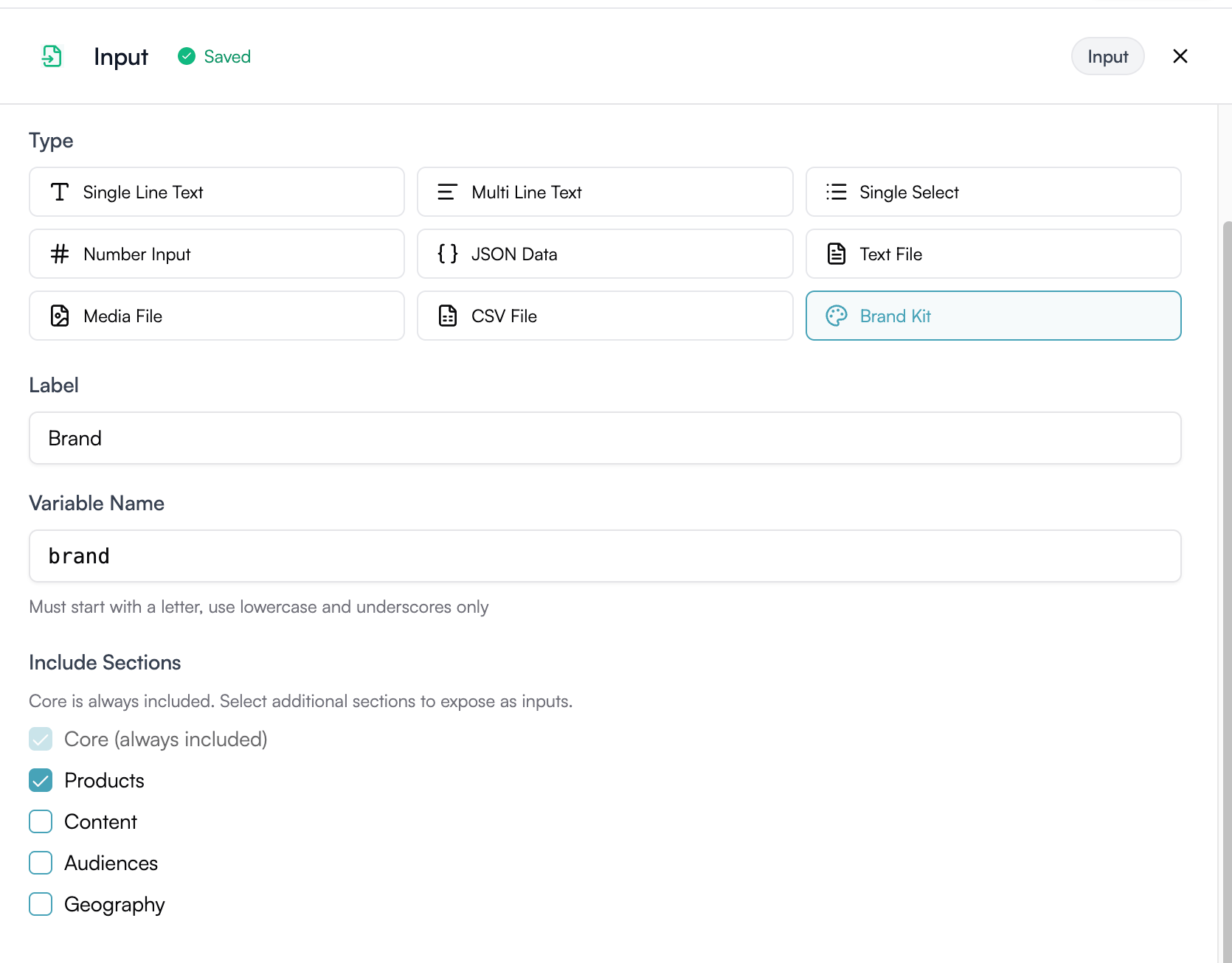
When you create a workflow input with the Brand Kit type, users can select a Brand Kit and optionally pick specific items from each category (a product, an audience, a content type, a geography).
To add a Brand Kit input to your workflow, select Brand Kit as the input type in the Input block configuration. Core is always included. Check the additional sections (Products, Content, Audiences, Geography) you want to expose as selectable inputs at runtime.
Inside the workflow, reference Brand Kit data using placeholders:
Brand name: {{input.brandkit.brand.name}}
Writing style: {{input.brandkit.writingSample.outLine}}
Selected product: {{input.brandkit.selected.product.name}}
Selected audience pain points: {{input.brandkit.selected.audience.painPoints}}
Best Practices
1. Start with Core and expand
Set up your brand name, URL, and competitors first. Add products, audiences, and content types as you build workflows that need them.
2. Be specific in product differentiators
Generic descriptions produce generic AI output. The more specific your differentiators and features, the better the generated content.
3. Write pain points in your audience’s language
Use the words your customers actually use. AI blocks pick up on this language and reflect it in generated content.
4. Create one audience per persona
Don’t combine multiple personas into one entry. Separate entries let you select the exact persona when running a workflow.
5. Keep content types distinct
Each content type should have a clearly different outline and writing style. If two content types are too similar, combine them.
What’s Next